環境
Mac OSX 10.7.5
brewでInstall
長い。
シンボリックリンクの変更
brewでインストールしただけでは、gccのシンボリックリンクは変わらない。
確認方法
変更
gcc -v等で、確認可能。
Mac OSX 10.7.5
長い。
brewでインストールしただけでは、gccのシンボリックリンクは変わらない。
gcc -v等で、確認可能。

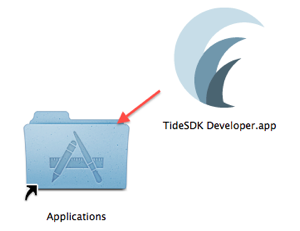
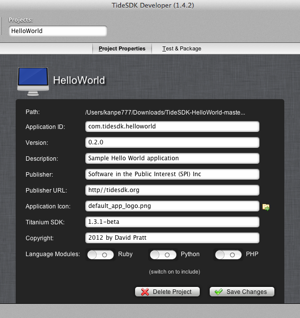
~/Library/ApplicationSupport/TideSDKmv TideSDK1.3.1-beta-osx-x86-84 ~/Library/Application\ Support/TideSDK




| >git clone https://github.com/gmarik/vundle.git ~/.vim/bundle/vundle
>vi .vimrc
|
| filetype off set rtp +=~/.vim/bundle/vundle/ call vundle#rc()
"必須
Bundle 'gmarik/vundle'
"---以下で管理
"githubにあるプラグイン
"www.vim.orgにあるプラグイン
"github以外のgitのリポジトリ
filetype plugin indent on
|
| :BundleInstall |
| ”githubにあるプラグイン Bundle 'altercation/vim-colors-solarized' |
| :BundleClean |
| >rvm 1.8.7 |
| >rvm 1.9.2 |
| >rvm system |
| >rvm --default 1.9.2 |
| >rvm reset |
| >rvm 1.9.2 >rvm gemset list gemsets for ruby-1.9.2-p290 (found in /Users/kanpe777/.rvm/gems/ruby-1.9.2-p290) global |
| >rvm gemset create test 'test' gemset created (/Users/kanpe777/.rvm/gems/ruby-1.9.2-p290@test). |
| >rvm gemset list gemsets for ruby-1.9.2-p290 (found in /Users/kanpe777/.rvm/gems/ruby-1.9.2-p290) global test |
| >rvm gemset delete test Are you SURE you wish to remove the entire gemset directory 'test' (/Users/kanpe777/.rvm/gems/ruby-1.9.2-p290@test)? (anything other than 'yes' will cancel) > |
| >rvm gemset create rails30 >rvm gemset create rails31 >rvm gemset create rails32 |
| >rvm gemset use rails30 |
| >rvm 1.9.2@rails30 |
| >rvm gemset list global => rails30 rails31 rails32 |
| >gem install sqlite3-ruby >gem install sqlite3 |
| >gem install -v=3.0.5 rails |
| >rvm 1.9.2@rails31 |
| >gem install sqlite3-ruby >gem install sqlite3 >gem install -v=3.1.1 rails |
| >rvm 1.8.7 |


| >mkdir Hello-World >cd Hello-World >git init >touch README >git add README >git commit -m 'first commit' >git remote add origin git@github.com:自分のアカウント名/Hello-World.git >git push origin master |
| >ruby -v ruby 1.9.3p0 (2011-10-30 revision 33570) [x86_64-darwin11] |
| >gem list ~ rails (3.1.3, 3.1.1) ~ |
| >sudo gem uninstall rails Select gem to uninstall: 1. rails-3.1.1 2. rails-3.1.3 3. All versions > 3 Successfully uninstalled rails-3.1.1 Remove executables: rails in addition to the gem? [Yn] y Removing rails Successfully uninstalled rails-3.1.3 |
| >sudo gem install rdoc Fetching: rdoc-3.11.gem (100%) Depending on your version of ruby, you may need to install ruby rdoc/ri data: <= 1.8.6 : unsupported = 1.8.7 : gem install rdoc-data; rdoc-data --install = 1.9.1 : gem install rdoc-data; rdoc-data --install >= 1.9.2 : nothing to do! Yay! Successfully installed rdoc-3.11 1 gem installed Installing ri documentation for rdoc-3.11... Installing RDoc documentation for rdoc-3.11... |
| >sudo gem install rails -v 3.1.1 |
| >rails new hoge |
| >cd hoge >rails server => Booting WEBrick => Rails 3.1.1 application starting in development on http://0.0.0.0:3000 => Call with -d to detach => Ctrl-C to shutdown server |
| >sudo port selfupdate |
| >vi .zshrc export PATH=/opt/local/bin:/opt/local/sbin:$PATH export MANPATH=/opt/local/share/man:/opt/local/man:$MANPATH |
